Kruti Dev 010 → Unicode (Mangal)
Word & Excel Converter
Upload a Word (.docx) or Excel (.xlsx) file typed in Kruti Dev 010 and download it in Unicode Hindi. The new file opens correctly on any computer, phone or portal, its words can be searched, and every table, image and heading stays where it was.
Only a few lines of text? Paste it in the text converter →
Other tools on this site
Drop your file here or click to browse
.docx or .xlsx files, up to 10 at once, max 15 MB per file
Your file is converted first. Review it side-by-side, then download
How to use this tool
- Upload your Kruti Dev 010 .docx or .xlsx file.
- Check the side-by-side preview and correct any word if needed. The fix applies everywhere it appears.
- Download the Unicode Hindi version with every table, image and format kept intact.
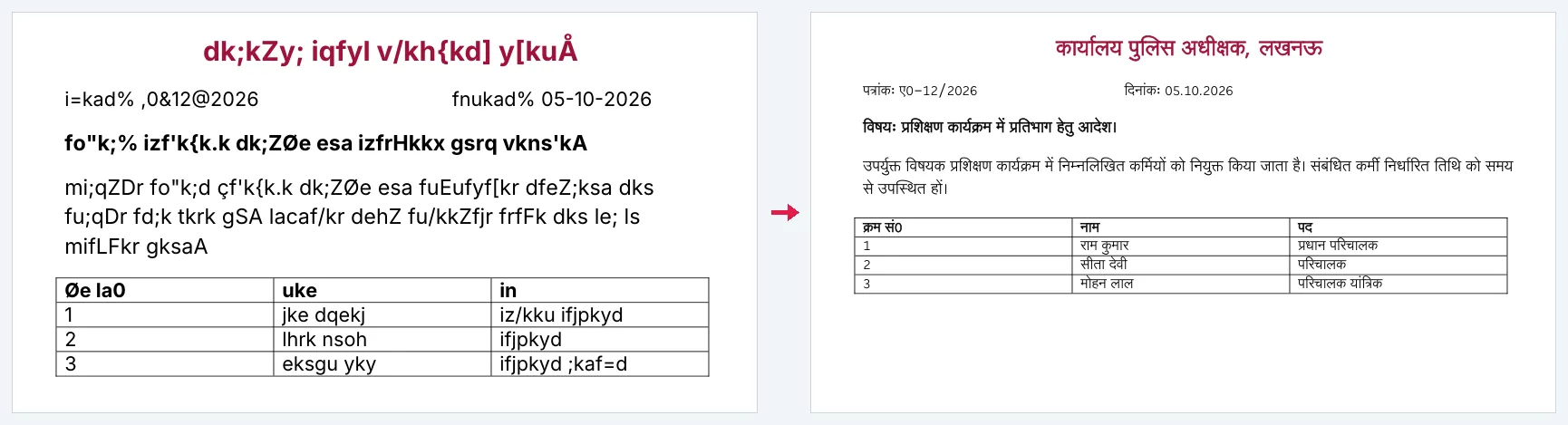
Why move off Kruti Dev at all?
A Kruti Dev file is only readable on a machine that has the Kruti Dev font installed. Email it to a colleague on a new laptop, open it on a phone, upload it to a portal, or paste it into a website, and it turns into a wall of nonsense Latin letters. It also cannot be searched, spell-checked, indexed, or read aloud, because as far as the computer is concerned the text is not Hindi at all.
Unicode fixes every one of those problems permanently. The same words, stored the way the rest of the world stores Hindi, work in Word, Google Docs, WhatsApp, e-office portals, e-mail and search. With no font to install anywhere.
Accuracy, and how it was checked
Kruti Dev is not a simple letter-for-letter substitution. The i-matra is typed before the consonant but displayed after it, the reph sits at the end of the typing order but on top of the syllable, and half-letters and conjuncts (क्क, त्र, श्र, ज्ञ, ट्, ठ्, ड्, ढ्, ध्, य्, ह्) each have their own key combinations. Getting these wrong is what makes most free converters produce almost-right Hindi.
The mapping used here was cross-checked character by character against a trusted government Kruti Dev ↔ Unicode reference converter and is covered by an automated test suite built from real government-document sentences. A common-typo dictionary of over 27,000 entries repairs the spelling mistakes that were in the original typing itself.
Formatting, headers and Excel
As with the other direction, the document is rewritten at the XML level: tables keep their borders and merged cells, images stay in place, headers and footers convert too, and each cell in an .xlsx is handled individually. There is also a preview, original and converted side by side, before you download, and you can correct a word in the preview and have that correction applied everywhere.
कृति देव 010 से यूनिकोड में बदलना
दफ्तरों, कोर्ट और टाइपिंग संस्थानों में सालों से कृति देव 010 में टाइप हुई फाइलें आज नए कम्प्यूटर और मोबाइल पर खुलती ही नहीं, अंग्रेजी के उल्टे-सीधे अक्षर दिखते हैं। यूनिकोड में आते ही वही फाइल हर जगह ठीक पढ़ी जाती है, उसमें शब्द सर्च होते हैं, और ई-ऑफिस या किसी भी पोर्टल पर सीधे चिपक जाती है।
.docx और .xlsx दोनों चलती हैं। टेबल, फोटो, हेडर-फुटर, बोल्ड-इटैलिक और रंग वैसे के वैसे रहते हैं, बदलते सिर्फ अक्षर हैं।
कृति देव की बनावट टेढ़ी है। इ की मात्रा अक्षर से पहले टाइप होती है, रेफ आखिर में आता है, और आधे अक्षर तथा संयुक्ताक्षर (क्क, त्र, श्र, ज्ञ) सबकी अपनी अलग कुंजियाँ हैं। यही वजह है कि मुफ्त कनवर्टर अक्सर लगभग-सही हिन्दी देकर छोड़ देते हैं, और बाकी आपको हाथ से ठीक करना पड़ता है।
यहाँ की मैपिंग एक सरकारी संदर्भ कनवर्टर से अक्षर-दर-अक्षर मिलाकर बनाई गई है। साथ में 27,000 से ज्यादा शब्दों की एक सूची लगी है, जिससे टाइपिंग की आम गलतियाँ अपने आप सुधर जाती हैं।
डाउनलोड से पहले दोनों रूप आमने-सामने दिखते हैं। कोई शब्द गलत बना हो तो वहीं दुरुस्त कर दीजिए। वह सुधार पूरी फाइल में लग जाता है।
Frequently Asked Questions
Is Kruti Dev to Unicode conversion accurate for half-letters and conjuncts?
Yes. Half-letters (ट्, ठ्, ड्, ढ्, ध्, य्, ह्) and conjuncts (क्क, त्र, श्र, ज्ञ) were mapped and verified character by character against a trusted government reference converter, and are covered by an automated test suite of real government-document sentences.
Do I need the Kruti Dev font to read the converted file?
No, that is the point. The output is standard Unicode Hindi and displays correctly in any Hindi font on any device, with nothing to install.
Will my tables and images survive?
Yes. Tables, merged cells, borders, images, headers and footers are preserved; only the text encoding changes.
Can I fix a wrongly converted word?
Yes. In the side-by-side preview you can enter the wrong word and its correct spelling, and the correction is applied throughout the document before you download.
Does the Excel converter handle a Kruti Dev to Unicode Excel file with mixed English and numbers in the same cell?
Yes. Each cell is converted individually, and Hindi, English and numbers inside the same cell are each kept in their correct script rather than being forced into one.
Will the Unicode text be in Mangal?
The converted Hindi is set in Mangal, the Unicode Hindi font every Windows computer has. Because it is Unicode, you can switch it to Nirmala UI, Kokila or any other Hindi font in Word without it breaking.
काम की गाइड
- कृति देव 010 फॉन्ट कैसे डाउनलोड और इंस्टॉल करेंकृति देव 010 फॉन्ट कम्प्यूटर में इंस्टॉल करने का पूरा तरीका, विंडोज में, और मोबाइल में क्यों नहीं होता। साथ में यह भी कि फॉन्ट न होने पर फाइल का क्या होता है।
- कृति देव और यूनिकोड में क्या फर्क हैकृति देव और यूनिकोड हिन्दी में असली अंतर क्या है, कौन सा कब इस्तेमाल करें, और पुरानी फाइलों का क्या करें, बिना तकनीकी शब्दजाल के।
- हिन्दी फाइल में अंग्रेजी के अक्षर या डिब्बे क्यों दिखते हैंवर्ड फाइल खोलने पर हिन्दी की जगह dk;kZy; जैसा कूड़ा या खाली डिब्बे दिखें तो इसका मतलब क्या है और कैसे ठीक करें।
- एक्सेल शीट में कृति देव को यूनिकोड में कैसे बदलेंकृति देव में भरी एक्सेल (.xlsx) शीट को यूनिकोड हिन्दी में बदलने का तरीका। किन खानों को बदला जाता है, फॉर्मूलों का क्या होता है, और कुछ खाने न बदलें तो क्या देखें।